About
Kajal Dhanjal

About me

I'm a Cyber Security analyst working in a self-managed live CSOC environment. What I can show you is the part most "I connected logs to a SIEM" projects skip: writing detections that catch real attacker behaviour while staying quiet on legitimate activity, and being honest in writing about the false positives, telemetry blind spots, and licensing constraints I ran into along the way.

My coherent thread across this lab is AI threat detection across identity and endpoint.

I also write blogs, turning the papers and ideas I'm reading into plain-English pieces on detection, incident response and human-centric cybersecurity.

This site showcases practical detection writeups, blue team strategies, and case studies drawn from both lab and research findings.

Microsoft Sentinel Detection Lab

Validated ATT&CK-mapped detections

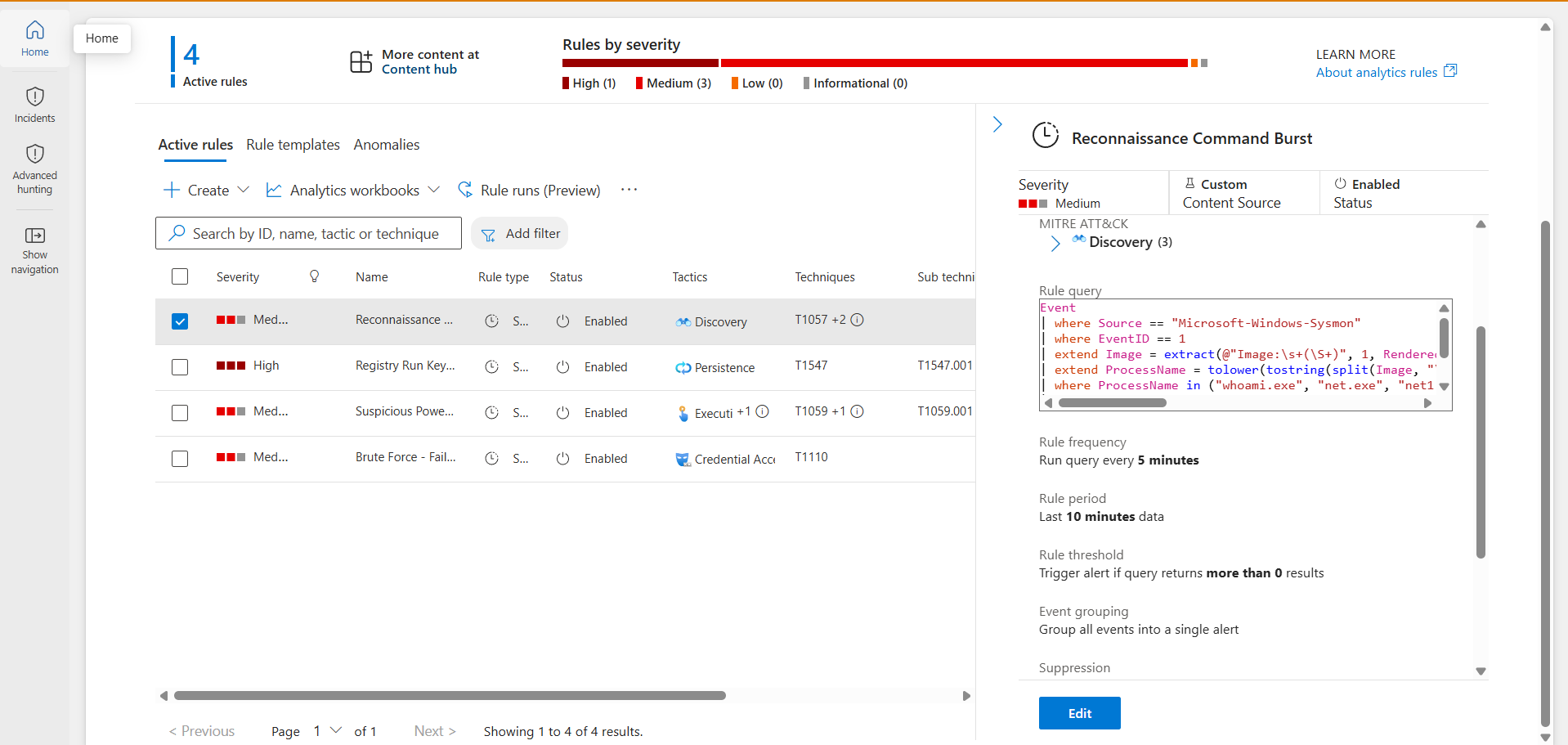
Windows and Entra ID telemetry into a Log Analytics workspace. Most fire on a simulated attack, confirmed quiet on benign activity where complete; the three AI-misuse rules go as far as the evidence allows, and each card says exactly where it stands.

Every card expands. Detection 05 is the one with automated response and a coverage audit behind it.

01
Brute-Force Failed Logons
T1110 · Credential AccessSecurity 4625
Live · validated

The threat

An attacker repeatedly attempts to log in with guessed credentials. Each failure writes a Windows Event ID 4625. A burst of these against one host in a short window is a strong brute-force signal.

The detection

// filter to failed logons → extract the attacked account from the
// event text → count failures per host in 5-minute windows
Event
| where EventLog == "Security"
| where EventID == 4625
| extend TargetAccount = extract(@"Account For Which Logon Failed:[\s\S]*?Account Name:\s+(\S+)", 1, RenderedDescription)
| where isnotempty(TargetAccount) and TargetAccount != "-"
| summarize FailedAttempts = count(), TargetedAccounts = make_set(TargetAccount) by Computer, bin(TimeGenerated, 5m)
| where FailedAttempts >= 5

Validation

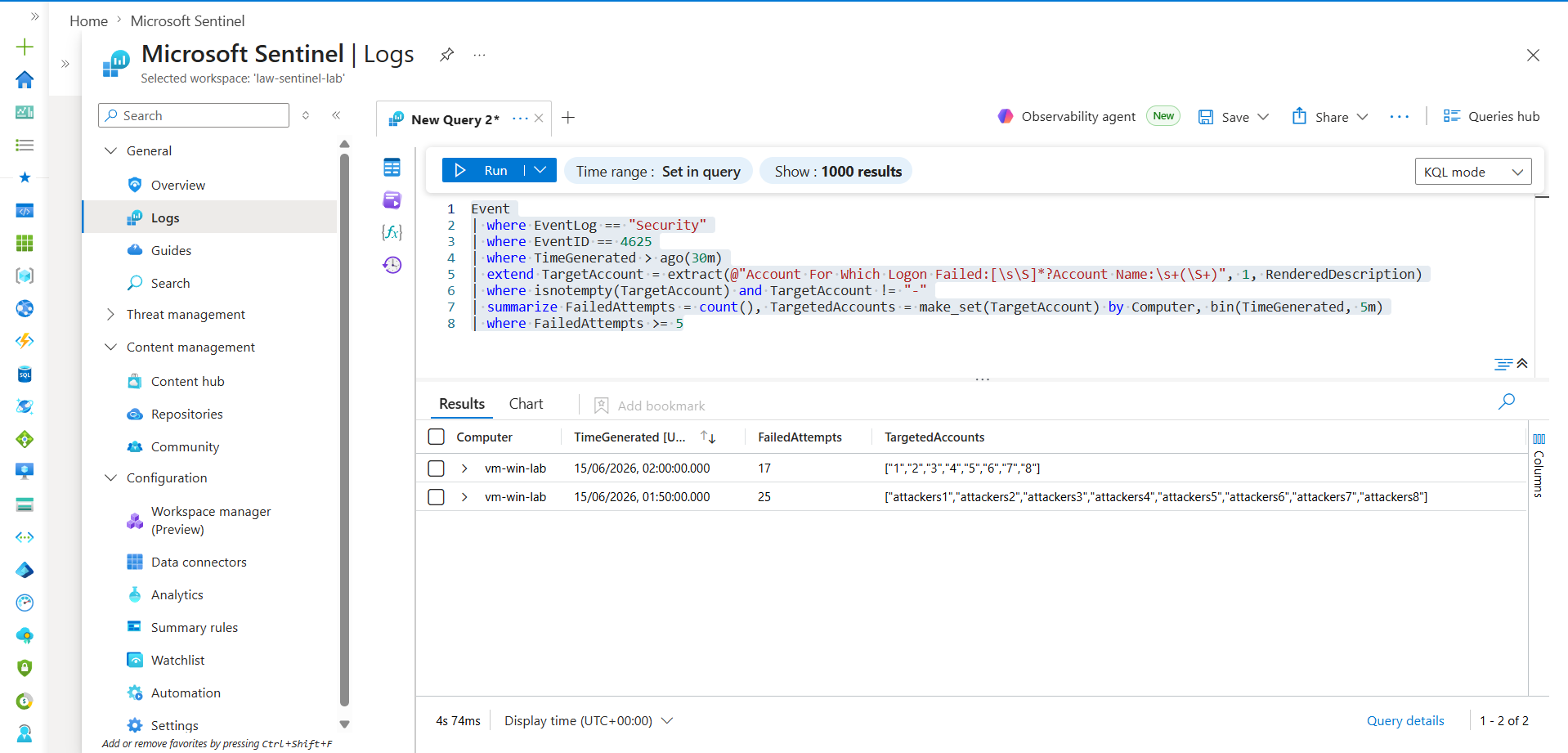
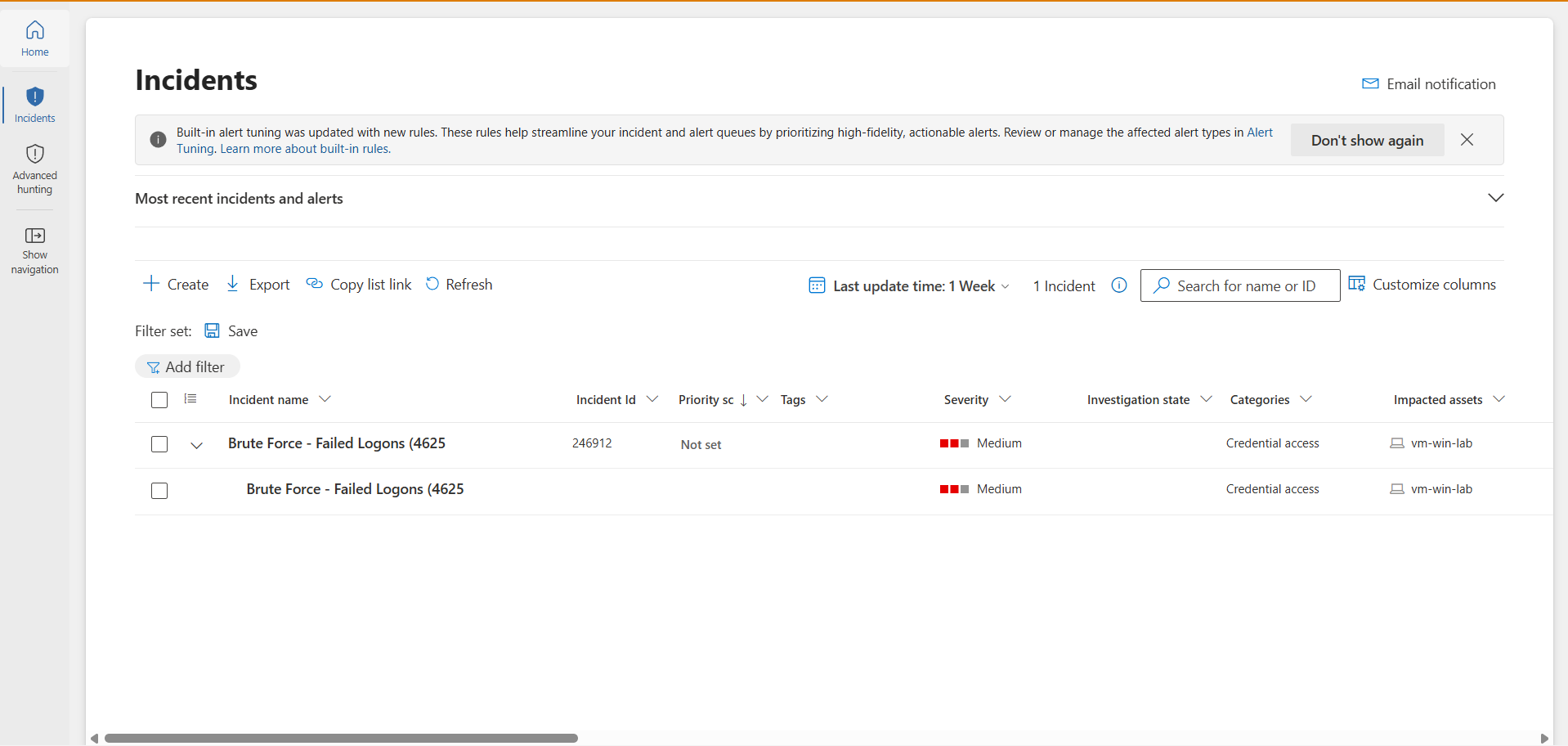
Simulated a brute-force burst on the lab VM via repeated runas failures. The detection returned a single row: 25 failed attempts in one 5-minute window, attacker usernames captured. The scheduled rule raised an incident automatically (Credential Access category).

Brute-force query returning 25 failed attempts with attacker accounts
Detection firing — 25 failed attempts, attacker accounts captured
Brute-force incident raised in Defender, Credential Access
Incident raised automatically (Credential Access)

Tuning notes / lessons

  • The target account lives inside RenderedDescription text, not a dedicated field — extracted via regex.
  • A 4625 event contains two "Account Name:" lines. The naive regex grabbed the Subject (process owner) instead of the attacked account — fixed by anchoring on "Account For Which Logon Failed:" first.
  • Manual testing produced sparse, slow attempts that didn't trip a tight window. The >= 5 threshold reflects real attack tempo, not test tempo.
02
Suspicious PowerShell Execution
T1059.001 / T1027 · Execution / Defense EvasionSysmon EID 1
Live · validated

The threat

Attackers frequently launch PowerShell with flags legitimate users rarely combine: encoded commands, hidden windows, execution-policy bypass, download cradles. Sysmon logs every process launch as Event ID 1 with the full command line.

The detection

Event
| where Source == "Microsoft-Windows-Sysmon"
| where EventID == 1
| extend Image = extract(@"Image:\s+(\S+)", 1, RenderedDescription)
| extend CommandLine = extract(@"CommandLine:\s+(.+?)\s+CurrentDirectory:", 1, RenderedDescription)
| where Image has "powershell" or Image has "pwsh"
| where CommandLine has_any ("-enc", "-EncodedCommand", "-nop", "-noprofile",
    "-w hidden", "-windowstyle hidden", "-exec bypass", "-executionpolicy bypass",
    "downloadstring", "iex", "invoke-expression", "frombase64string")
| project TimeGenerated, Computer, Image, CommandLine

Validation

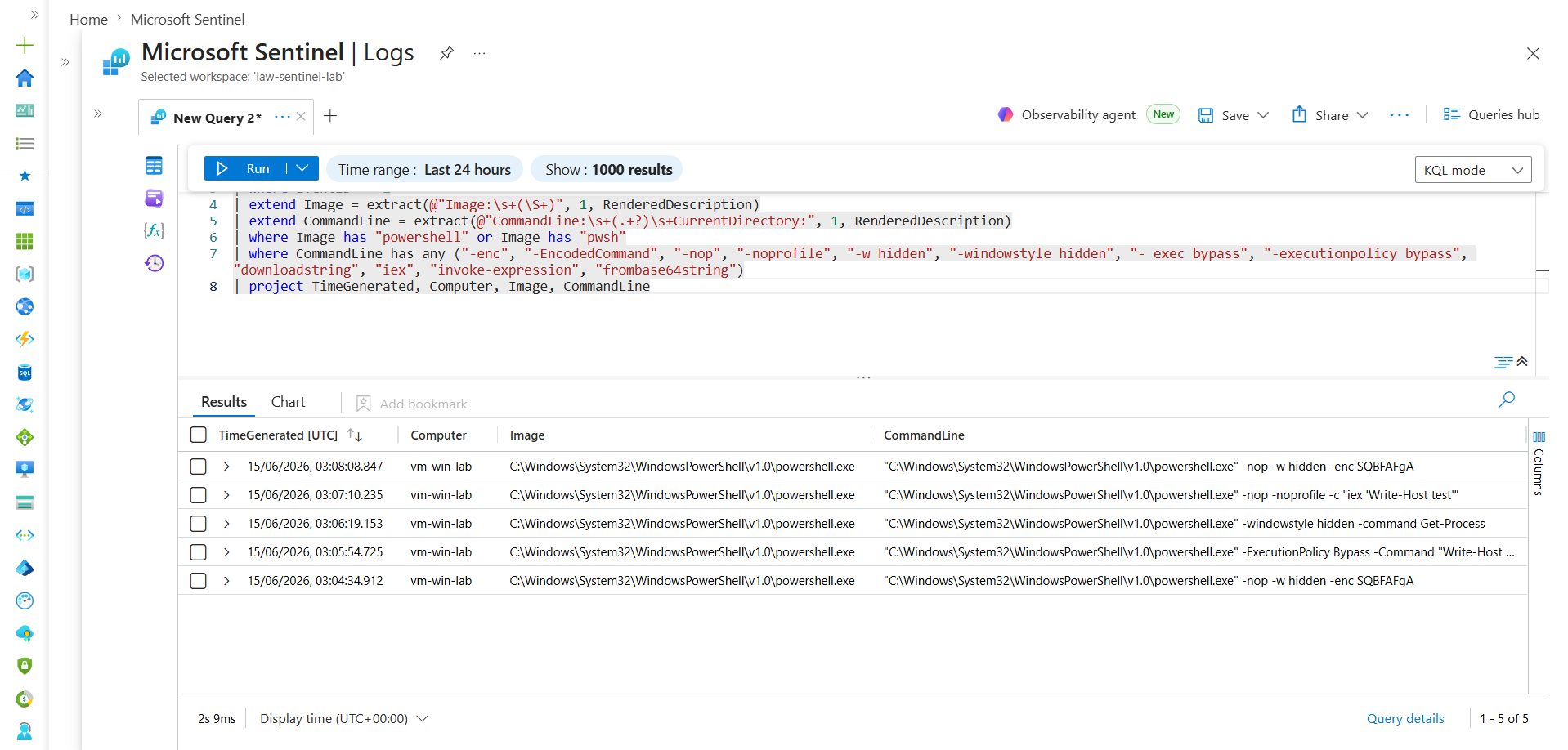
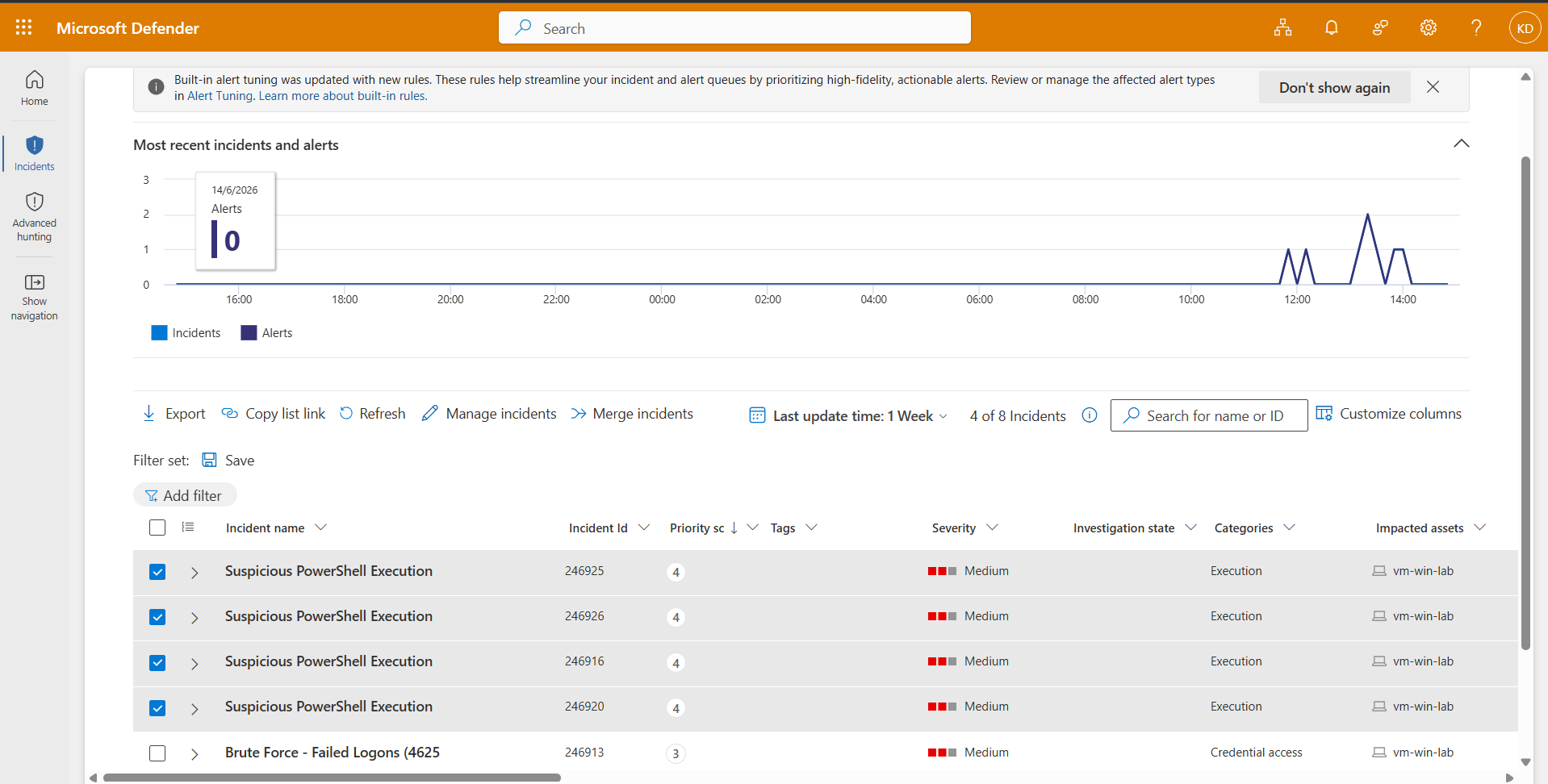
Ran benign-but-suspicious-looking PowerShell (harmless — carries the flags attackers use, does nothing damaging). The detection returned all four launches with command lines correctly matched.

Suspicious PowerShell query showing flagged command lines
Flagged command lines
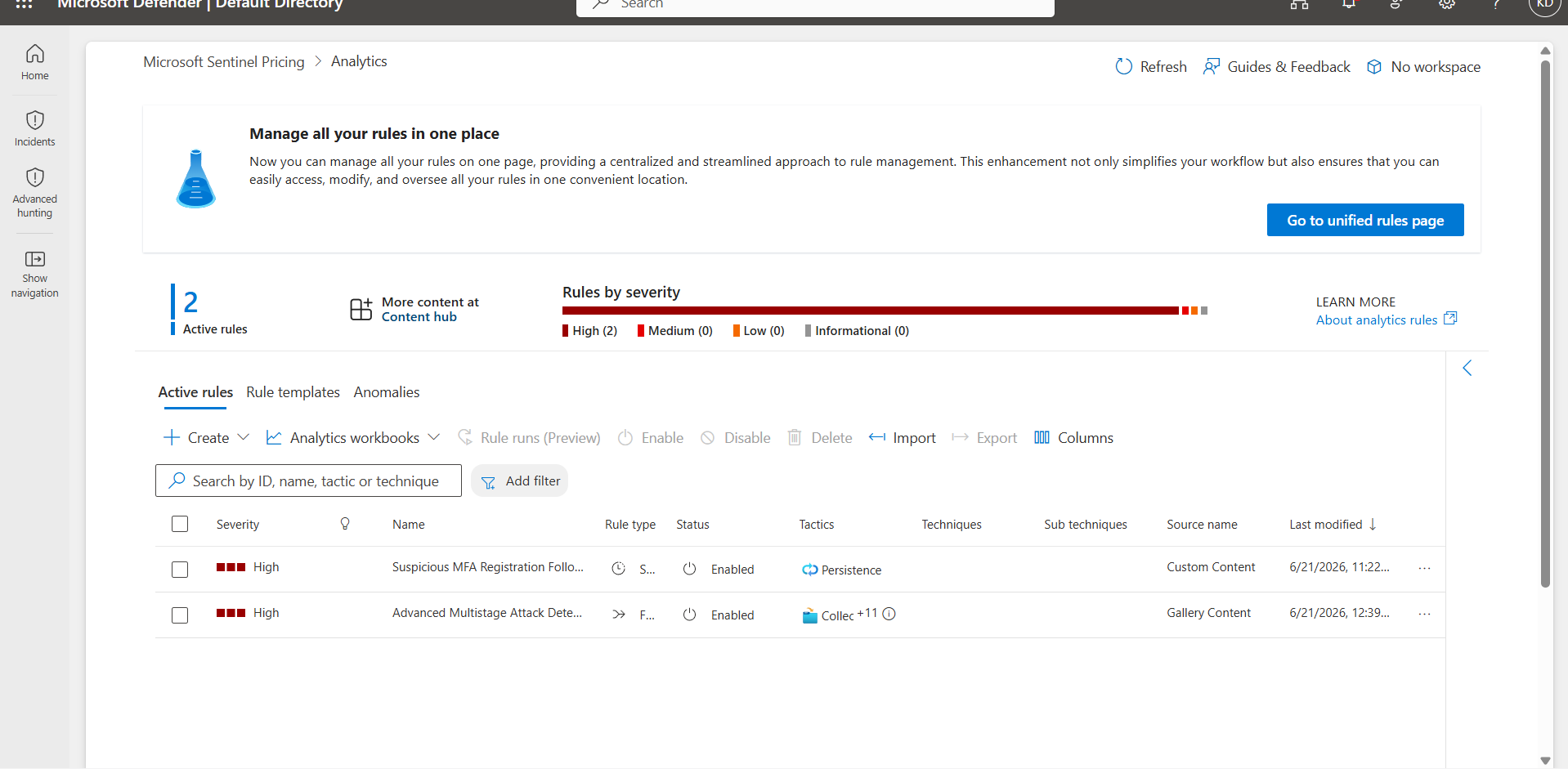
Suspicious PowerShell incidents in Defender
Incidents raised (Execution category)

Tuning notes / lessons

  • Unlike Detection 1 (volume threshold), this fires on a single match — a known-bad flag is itself the signal, no aggregation needed.
  • No malicious PowerShell existed in the logs to begin with — test data had to be generated before validation was possible.

Known false positives

  • -nop and -ExecutionPolicy Bypass are occasionally used by legitimate admin scripts. Production tuning: require 2+ suspicious flags together, or exclude known-good signed scripts by hash/path.
03
Registry Run-Key Persistence
T1547.001 · PersistenceSysmon EID 13
Live · validated

The threat

To survive reboots, malware commonly writes itself into a registry autostart location — CurrentVersion\Run, RunOnce, or Winlogon shell keys. Sysmon logs registry modifications as Event ID 13.

The false positive — and the tuning

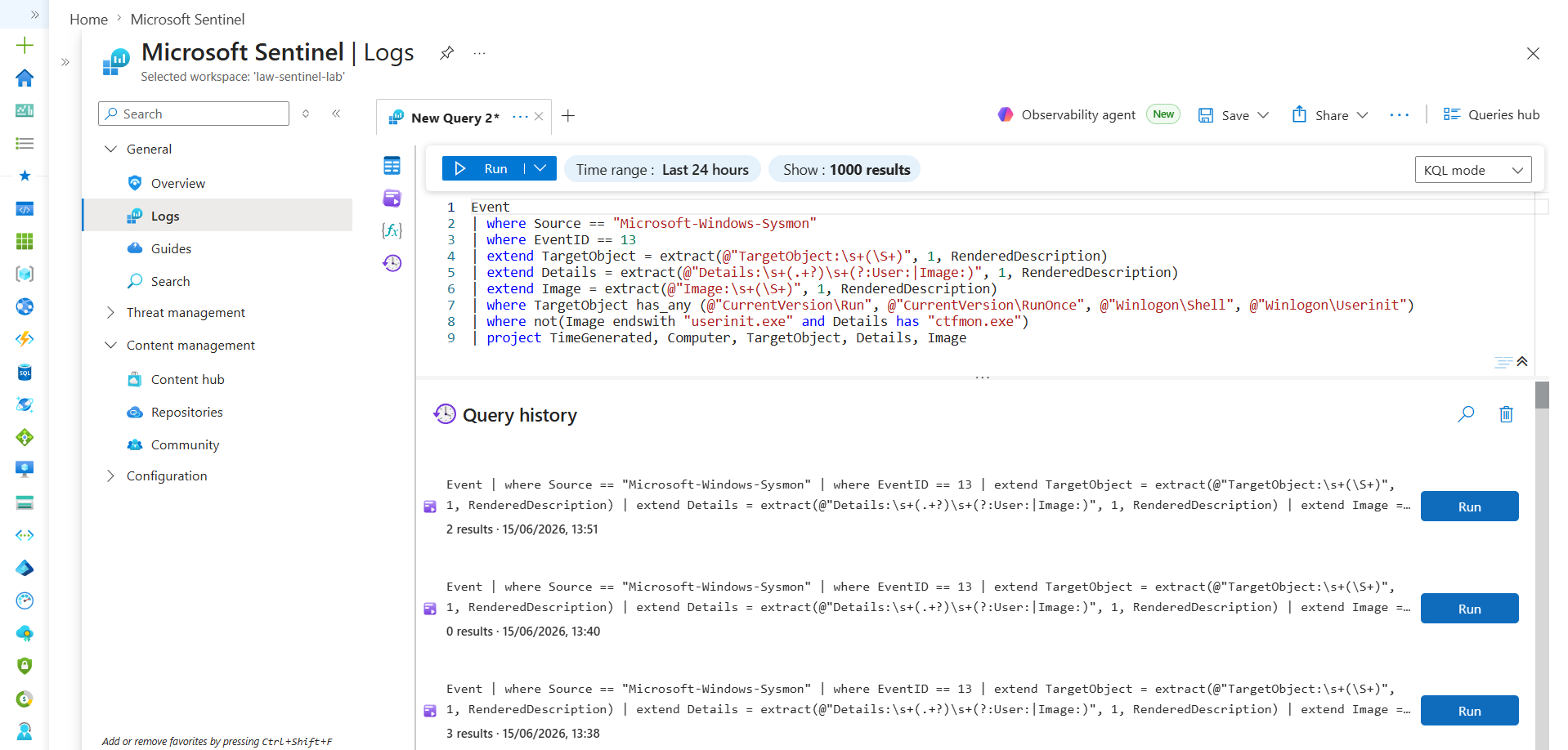
The naive version fired on real, legitimate activity: userinit.exe writing ctfmon.exe (Windows' own text/input service) to a Run key. The rule wasn't wrong — it correctly matched "a write to an autostart location" — it was too broad. A rule that fires on benign activity is worse than useless: it trains analysts to dismiss the alert, so a real attack tripping the same rule gets ignored too.

The detection (tuned)

Event
| where Source == "Microsoft-Windows-Sysmon"
| where EventID == 13
| extend TargetObject = extract(@"TargetObject:\s+(\S+)", 1, RenderedDescription)
| extend Details = extract(@"Details:\s+(.+?)\s+(?:User:|Image:)", 1, RenderedDescription)
| extend Image = extract(@"Image:\s+(\S+)", 1, RenderedDescription)
| where TargetObject has_any (@"CurrentVersion\Run", @"CurrentVersion\RunOnce",
    @"Winlogon\Shell", @"Winlogon\Userinit")
// narrow allowlist — excludes only the exact benign combination,
// not userinit.exe wholesale (a broad exclusion would let an
// attacker abuse userinit.exe slip straight through)
| where not(Image endswith "userinit.exe" and Details has "ctfmon.exe")
| project TimeGenerated, Computer, TargetObject, Details, Image

Validation (both sides)

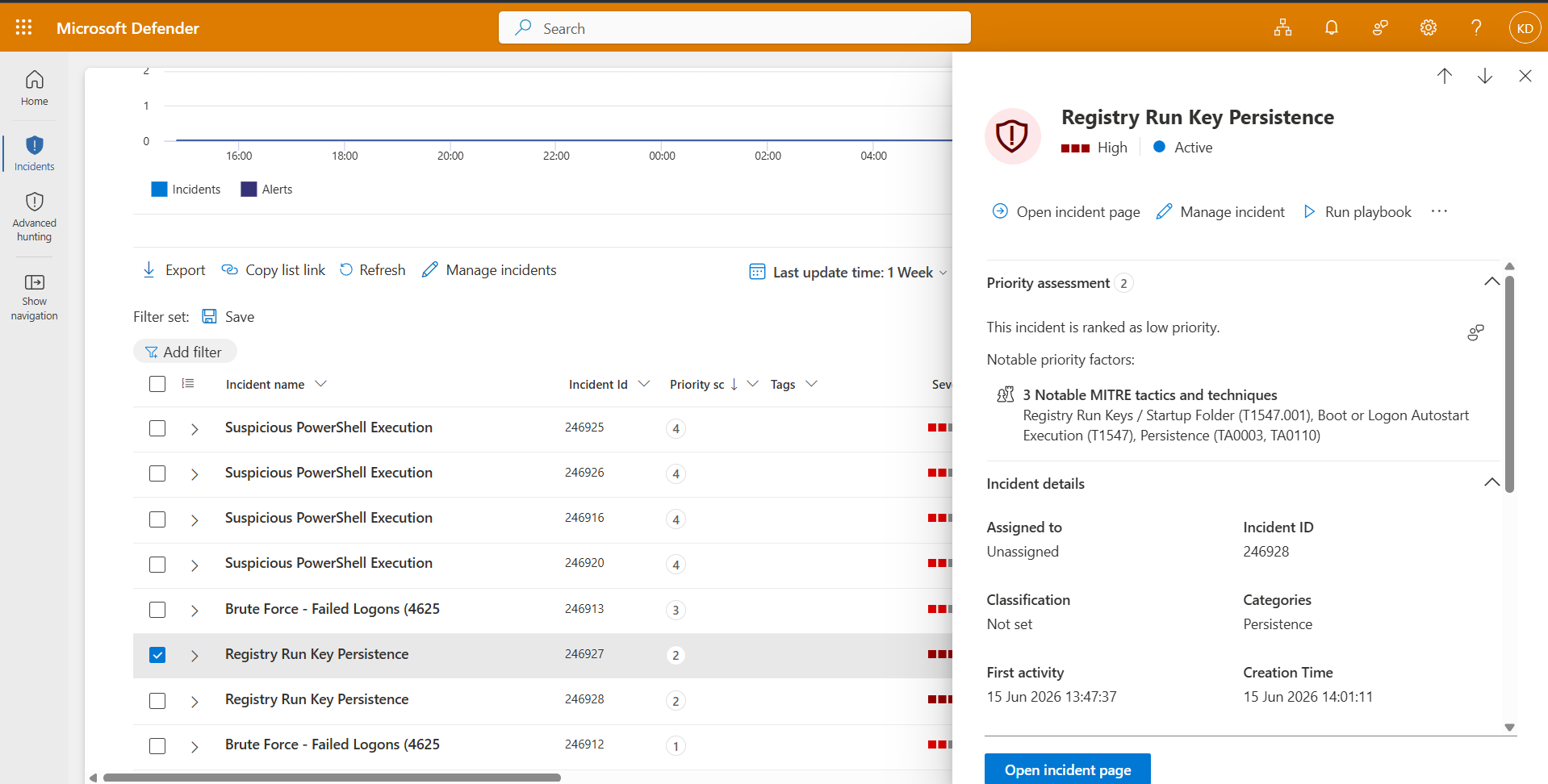
True positive — planted a fake persistence entry via New-ItemProperty: caught. False positive — the legitimate ctfmon.exe write: correctly did not fire after tuning. The scheduled rule raised a High-severity incident with an attack-story graph.

Registry persistence query catching the planted entry
Catching the planted entry, ignoring the ctfmon write
Registry persistence incident, High severity, T1547.001
High-severity incident, T1547.001
04
Reconnaissance Command Burst
T1057 / T1082 / T1016 · DiscoverySysmon EID 1
Live · validated

The threat

When an attacker first lands on a host, they orient themselves — whoami, net user, systeminfo, ipconfig, tasklist, arp, and similar. No single command is malicious; every one runs during legitimate administration. The signal is variety — many different recon tools from one host in a short window — not any individual command.

The detection

Event
| where Source == "Microsoft-Windows-Sysmon"
| where EventID == 1
| extend Image = extract(@"Image:\s+(\S+)", 1, RenderedDescription)
| extend ProcessName = tolower(tostring(split(Image, "\\")[-1]))
| where ProcessName in ("whoami.exe","net.exe","net1.exe","nltest.exe",
    "systeminfo.exe","ipconfig.exe","tasklist.exe","hostname.exe",
    "nslookup.exe","arp.exe","route.exe")
| summarize ReconCommands = make_set(ProcessName),
    DistinctReconCount = dcount(ProcessName) by Computer, bin(TimeGenerated, 10m)
| where DistinctReconCount >= 5

The key line is dcount(ProcessName) — distinct commands, not total. Ten runs of whoami alone isn't recon; whoami + net + nltest + systeminfo + ipconfig is. The detection measures variety, not volume.

Validation

Ran a 10-command recon burst. The detection returned a single row: distinct count of 9, full command set captured. Incident raised under Discovery category.

Recon detection showing 9 distinct recon commands clustered
9 distinct recon commands clustered
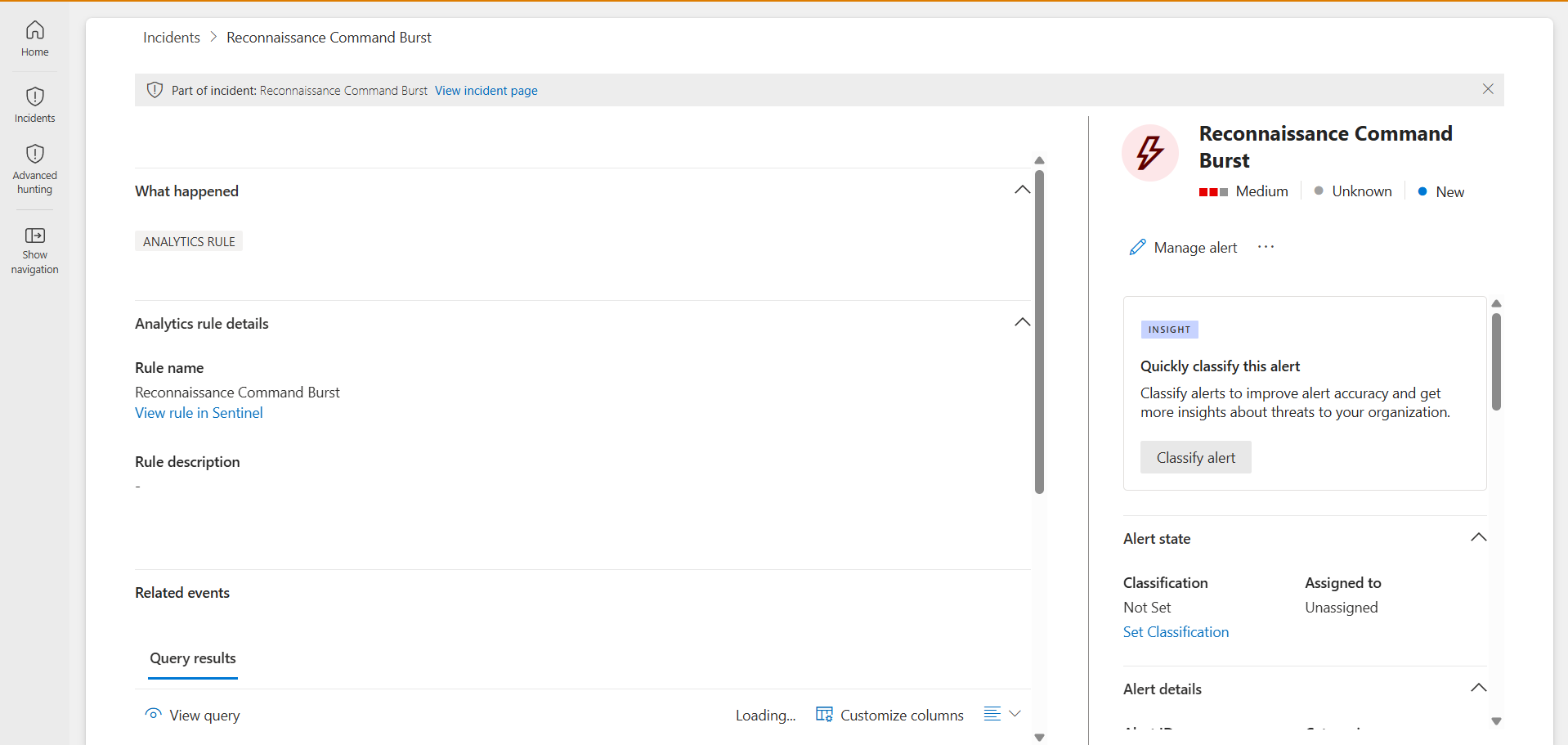
Reconnaissance command burst incident in Defender, Discovery
Incident raised (Discovery)

Tuning notes / lessons

  • Windows logs some process names uppercase (ARP.EXE), others lowercase. Without normalising case, dcount silently under-counted and the detection appeared broken when it wasn't — fixed with tolower(...).
  • Unlike Detection 3 (fixed by narrowing), the false-positive risk here is a sysadmin legitimately running several commands during troubleshooting — so the tuning lever was the threshold (raised 4 → 5), not an exclusion. Different false-positive shape, different tool.
05
Suspicious MFA Registration Following Sign-In from Untrusted IP
T1556.006 · PersistenceEntra ID SignInLogs + AuditLogs+ SOAR automation
Live · automated response

The threat

Once an attacker has a foothold on a credential, registering their own MFA method is one of the cleanest ways to keep access — the victim can reset their password and the attacker is still in. "User registered a new MFA method" looks completely normal in isolation; the signal isn't the registration itself, it's the registration happening shortly after a sign-in that doesn't look like the account owner.

The plan vs. the constraint: the clean build uses Entra ID Protection P2's risk score directly. This lab runs in a personal Azure free tenant — the P2 trial wouldn't activate, no path to a workaround. Rather than block on it, I built a heuristic substitute: a hardcoded trusted-IP allowlist checked against SignInLogs.IPAddress. Coarser than a real risk score (no device/location-velocity/threat-intel scoring behind it) — documented as a tradeoff, not pretended away.

Detection logic

Correlates two Entra ID signals within a 30-minute window: a sign-in from an untrusted IP, and a same-user AuditLogs entry for "User started security info registration."

let TrustedIPs = dynamic(["<office/home IP 1>", "<office/home IP 2>"]);
let UntrustedSignIns = SigninLogs
| where IPAddress !in (TrustedIPs)
| where ResultType == 0
| project SignInTime = TimeGenerated, UserPrincipalName, IPAddress, Location;
let MFARegistrations = AuditLogs
| where ActivityDisplayName == "User started security info registration"
| extend UserPrincipalName = tostring(InitiatedBy.user.userPrincipalName)
| project RegTime = TimeGenerated, UserPrincipalName;
UntrustedSignIns
| join kind=inner MFARegistrations on UserPrincipalName
| where RegTime between (SignInTime .. (SignInTime + 30m))
| summarize arg_min(SignInTime, *) by UserPrincipalName, IPAddress
| project SignInTime, RegTime, UserPrincipalName, IPAddress, Location

Simulating the attack

Baseline sign-in from my real AU IP → connected via Proton VPN (Seattle, US exit node), signed in again from the untrusted IP → registered a new MFA method from that same VPN session, the actual T1556.006 action.
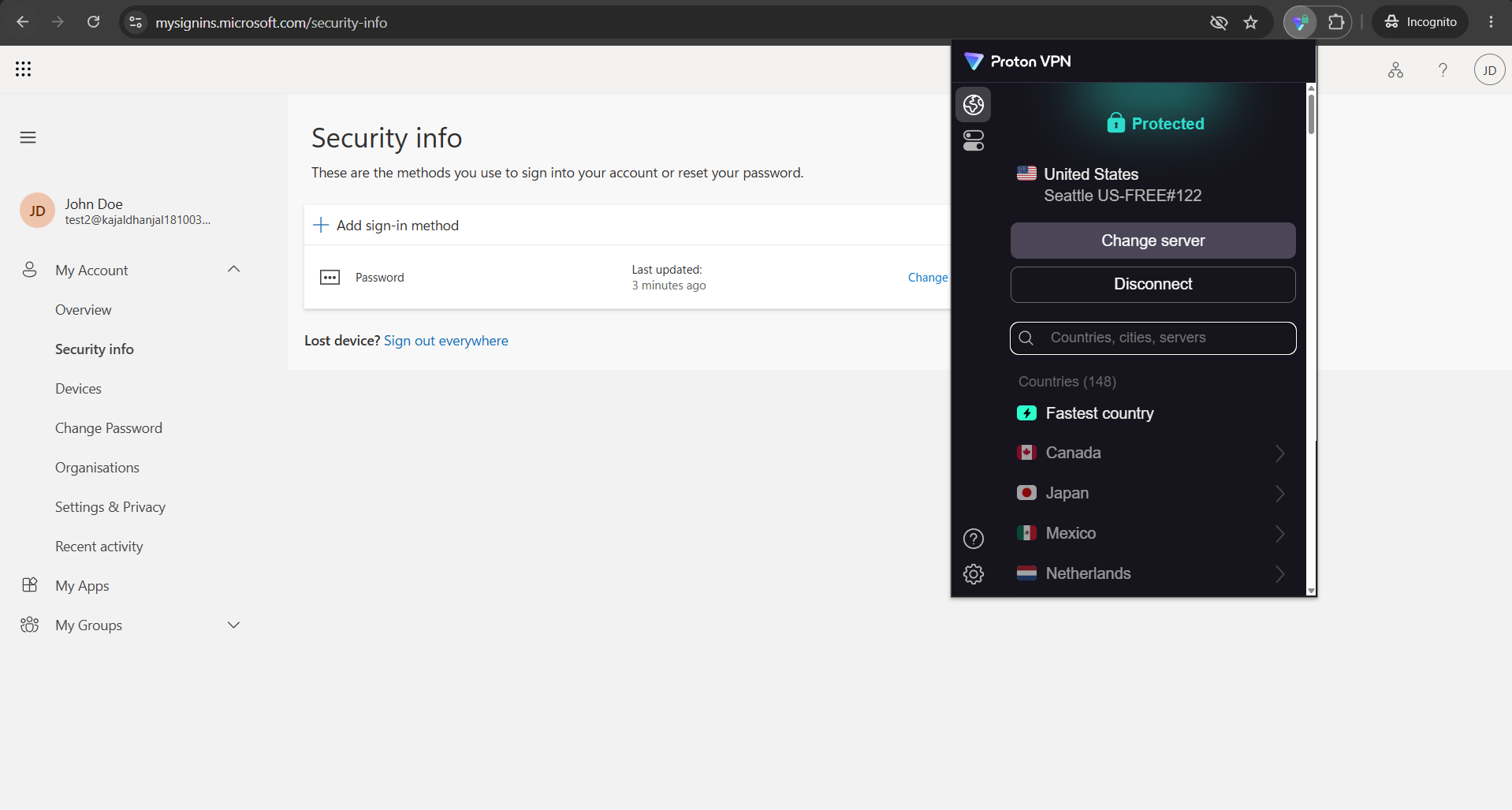
Sign-in log entry showing untrusted-IP sign-in correlated with security-info registration
Untrusted-IP sign-in correlated with registration
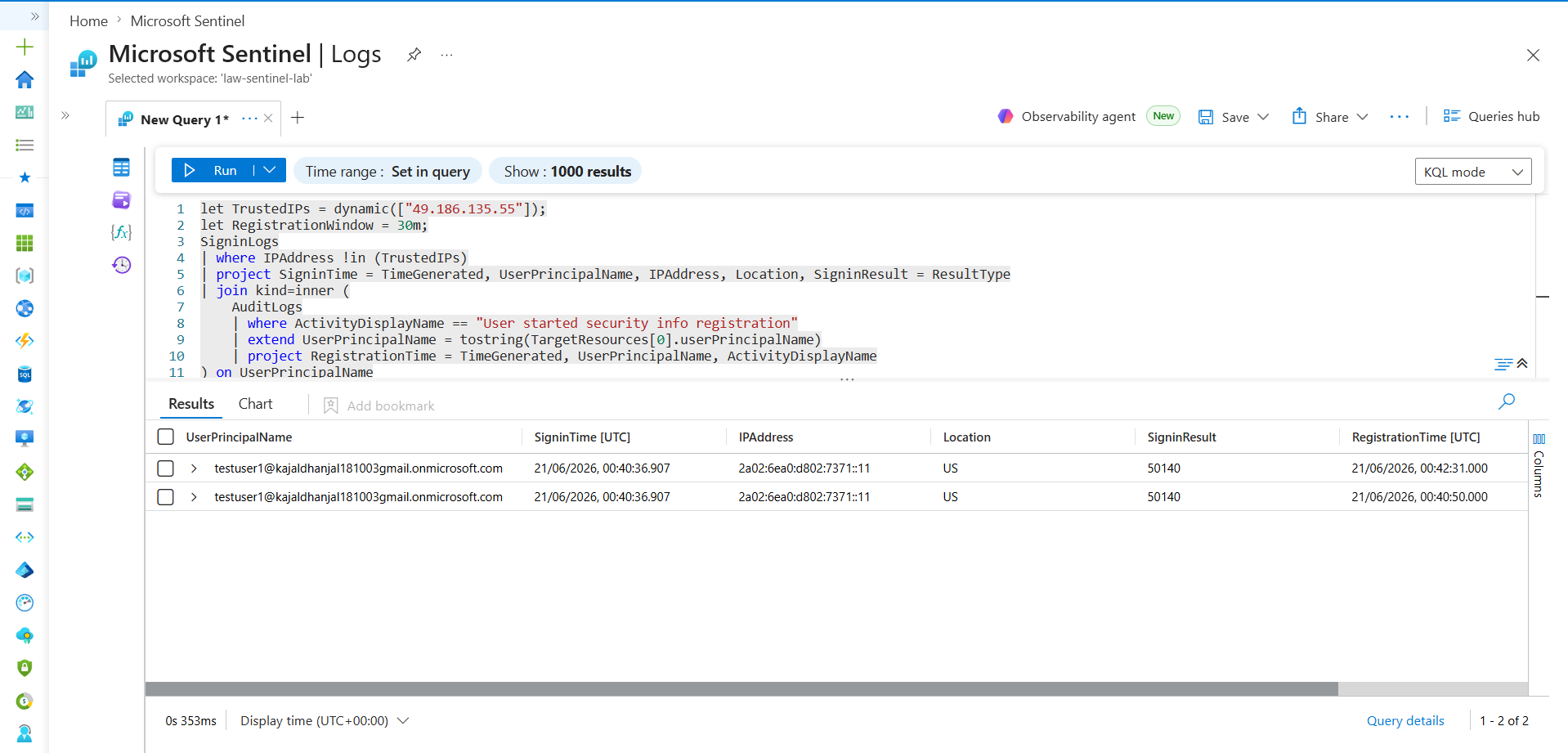
MFA registration KQL query and deduped correlation result
Deduped correlation result
Analytics rule configuration — High severity, T1556.006 mapping
Rule config — High severity, T1556.006, entity mapping

Closing the loop: automated response

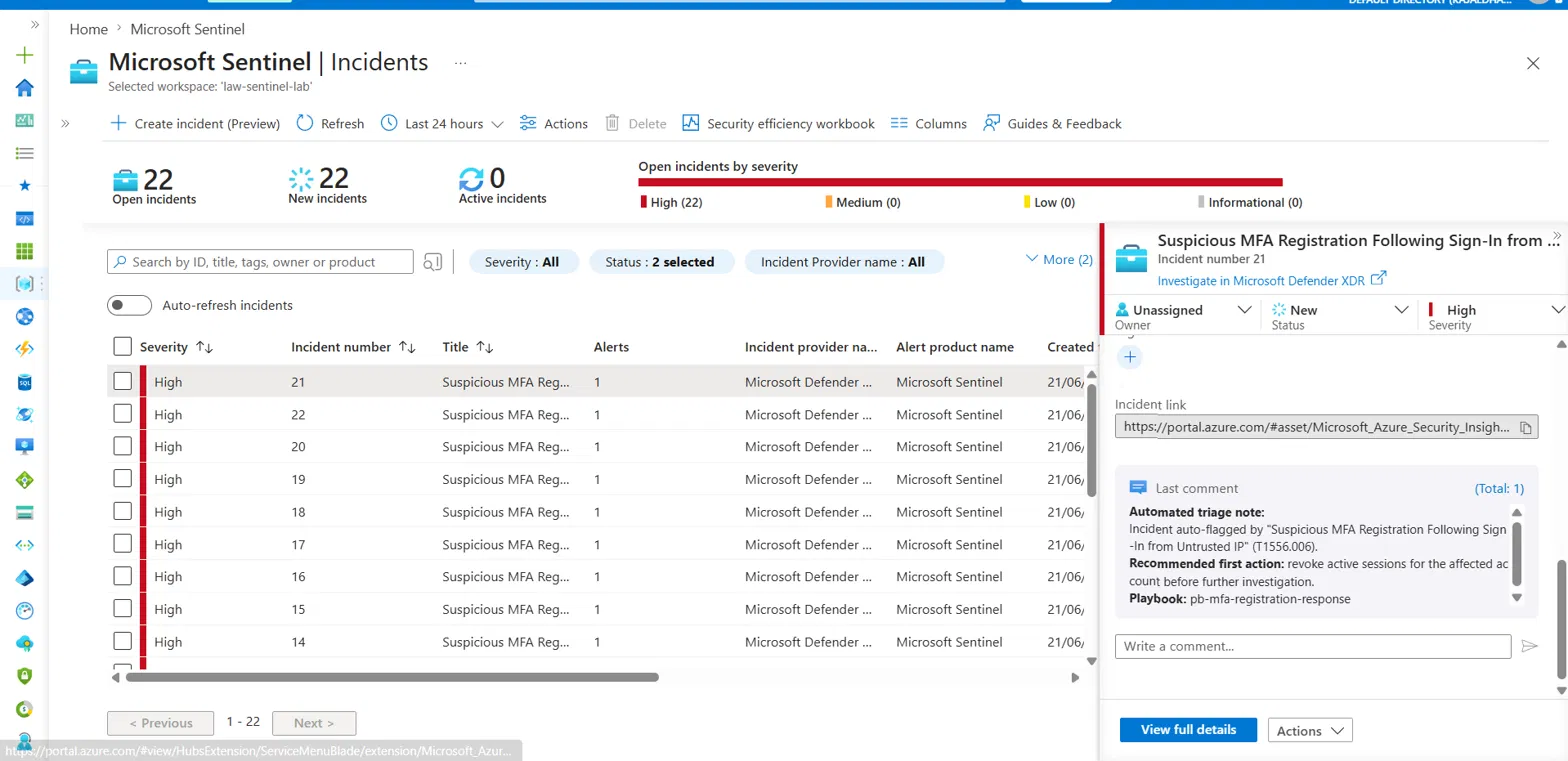
Every other detection in this lab stops at "incident created." This one doesn't. A Sentinel automation rule fires on incident creation, runs an Azure Logic App, and posts a triage comment recommending the first containment step — revoking active sessions — referencing the IR playbook.

The original plan had the playbook write to a Sentinel watchlist (auto-blocking the flagged IP). The watchlist UI in Defender XDR was broken at build time, making watchlist writes from Logic Apps unreliable. I scoped the automation down to "add comment to incident" — a smaller, reliable action — rather than ship something flaky for a better demo.
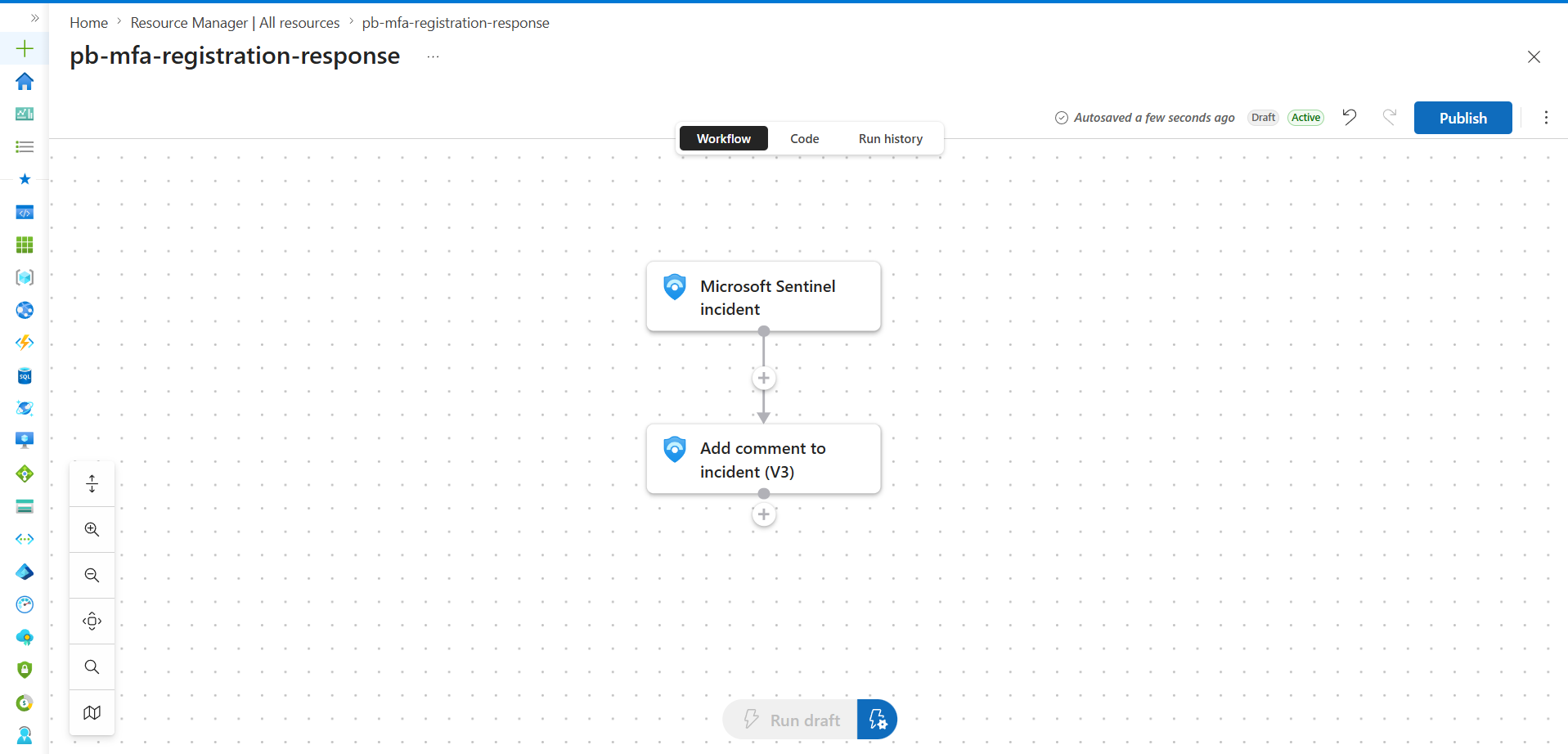
Logic App workflow — incident trigger wired to Add comment to incident action
Logic App: trigger → add-comment action
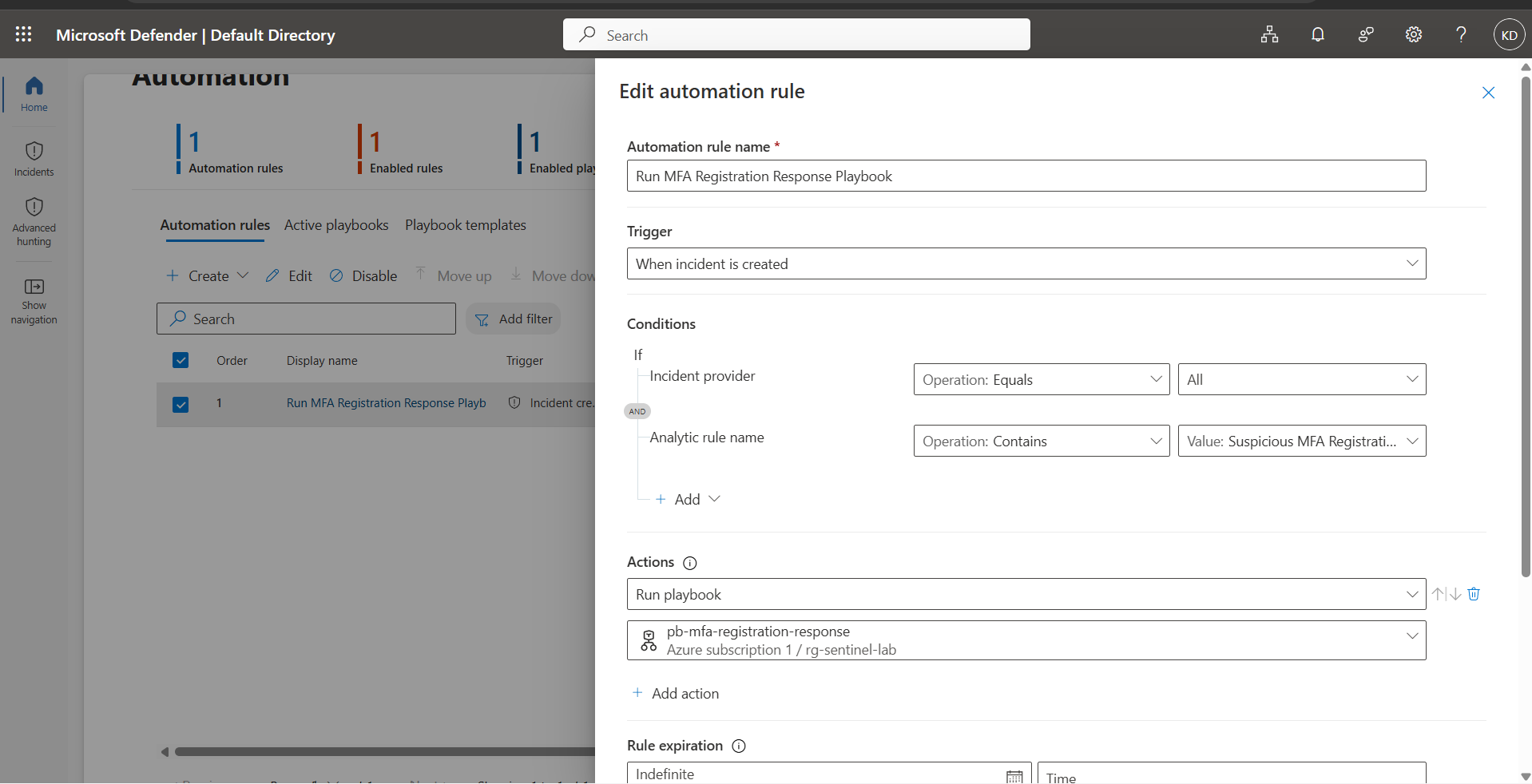
Automation rule wiring playbook to incident creation
Automation rule wiring
MFA registration incident in Defender with automated triage comment visible
Incident raised with the automated triage comment already attached

What I'd tune next

  • Cross-run deduplication — current summarize dedup only protects within a single run's lookback window.
  • Externalise the trusted-IP list to a proper watchlist once the UI issue resolves.
  • Layer in real risk scoring if/when P2 is available — Variant B is a substitute, not a replacement.
This is the rule that generalised. In a coverage audit against two real 2026 intrusions — FortiBleed and JadePuffer — this was the only detection in the lab that came close to either, because it keys on a behaviour rather than a technology. Read the coverage audit →

Full IR playbook for this detection ↓

06
Shadow AI Tooling Execution
T1588.002 · imperfect fit, flaggedSysmon EID 1
True-positive validated · not stress-tested
On the MITRE mapping: T1588.002 describes an attacker acquiring tooling pre-compromise — not a clean match for an employee installing AI software on a managed endpoint. This rule is closer to shadow-IT/governance visibility than classic threat detection, and this writeup says so rather than overstating the ATT&CK alignment.

The threat

Employees running local or desktop AI tooling — LLM runners, AI coding assistants, desktop chatbot clients — outside any sanctioned IT process. Not inherently malicious; it's a visibility gap, since unsanctioned AI tools can move data through model context without enterprise DLP or logging.

The detection

Event
| where Source == "Microsoft-Windows-Sysmon"
| where EventID == 1
| extend Image = extract(@"Image:\s+(\S+)", 1, RenderedDescription)
| extend ProcessName = tolower(tostring(split(Image, "\\")[-1]))
| where ProcessName has_any (
    "ollama.exe", "llamafile.exe", "lm-studio.exe", "lmstudio.exe",
    "chatgpt.exe", "claude.exe", "gemini.exe", "copilot.exe",
    "cursor.exe", "aider.exe", "openai.exe"
  )
| project TimeGenerated, Computer, Image, ProcessName

Validation

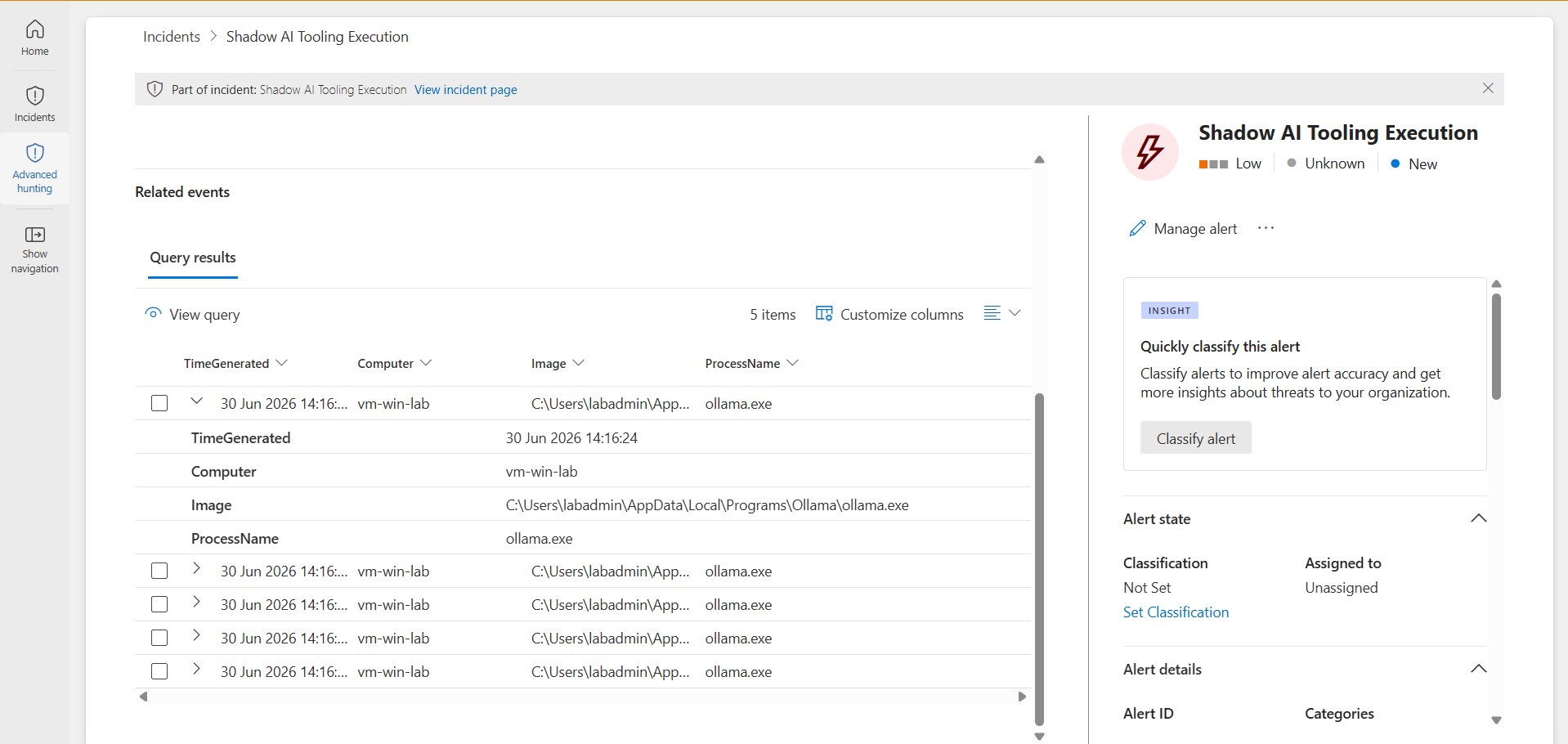
True positive: installed real Ollama on the lab VM, confirmed the process running, queried Sentinel — 5 matching rows with a clean full path.

False-positive side: not yet tested. Only one validation pass has been run. Stated plainly rather than implying a clean bill of health.

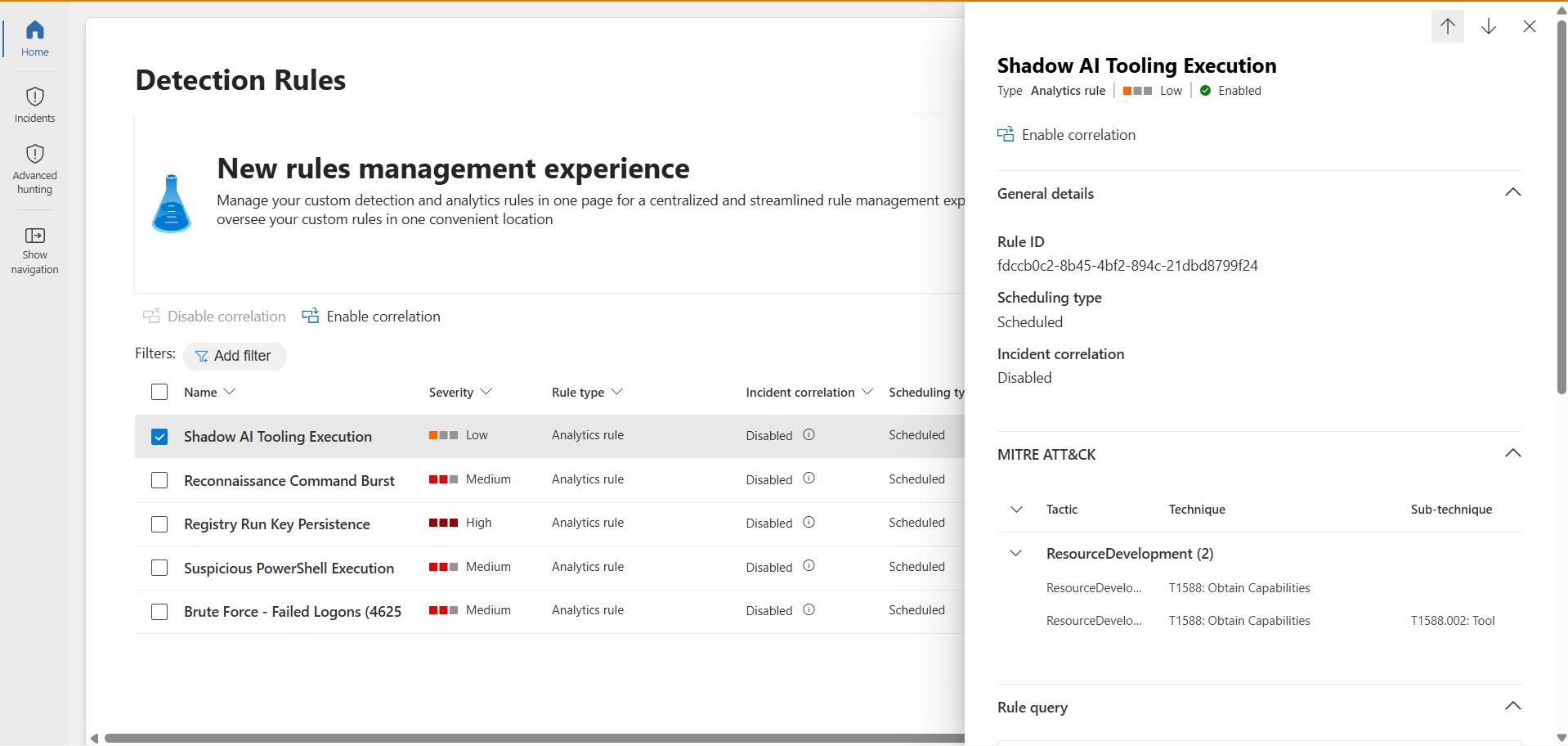
Shadow AI Tooling Execution rule configured and enabled in Sentinel
Rule configured and enabled
Incident with related events showing captured ollama.exe process creation
Incident — captured ollama.exe execution
07
Endpoint-to-AI-Service Data Egress
T1567 · imperfect fit, flaggedSysmon EID 3
Rule live · telemetry gap documented

What broke the original design

Not a tuning exercise in the usual sense — two real telemetry limitations forced a redesign. CDN-edge hostnames break domain matching: even confirmed real connections showed DestinationHostname as a CDN edge name or blank, never the literal domain. Browser traffic is invisible to this telemetry entirely: a systematic check showed zero msedge.exe rows despite multiple tabs open, because the SwiftOnSecurity Sysmon baseline config excludes browser processes from network-connection logging by design.

This means the rule, as built, cannot detect browser-based AI usage — e.g. pasting data into a web chat UI — only non-browser, direct-process egress. Documented as an open, known gap, not silently worked around.

The detection (redesigned)

Event
| where Source == "Microsoft-Windows-Sysmon"
| where EventID == 3
| extend Image = extract(@"Image:\s+(\S+)", 1, RenderedDescription)
| extend ProcessName = tolower(tostring(split(Image, "\\")[-1]))
| extend DestinationPort = extract(@"DestinationPort:\s+(\S+)", 1, RenderedDescription)
| where ProcessName has_any ("ollama.exe", "llamafile.exe", "lmstudio.exe", "python.exe", "node.exe")
   and DestinationPort in ("443", "80")
| project TimeGenerated, Computer, Image, DestinationPort

Validation

True positive: Ollama on the VM was making real outbound calls to Google-hosted infrastructure on port 443 — observed organically, confirming the rule catches real egress from known AI tooling. 8 matching rows.

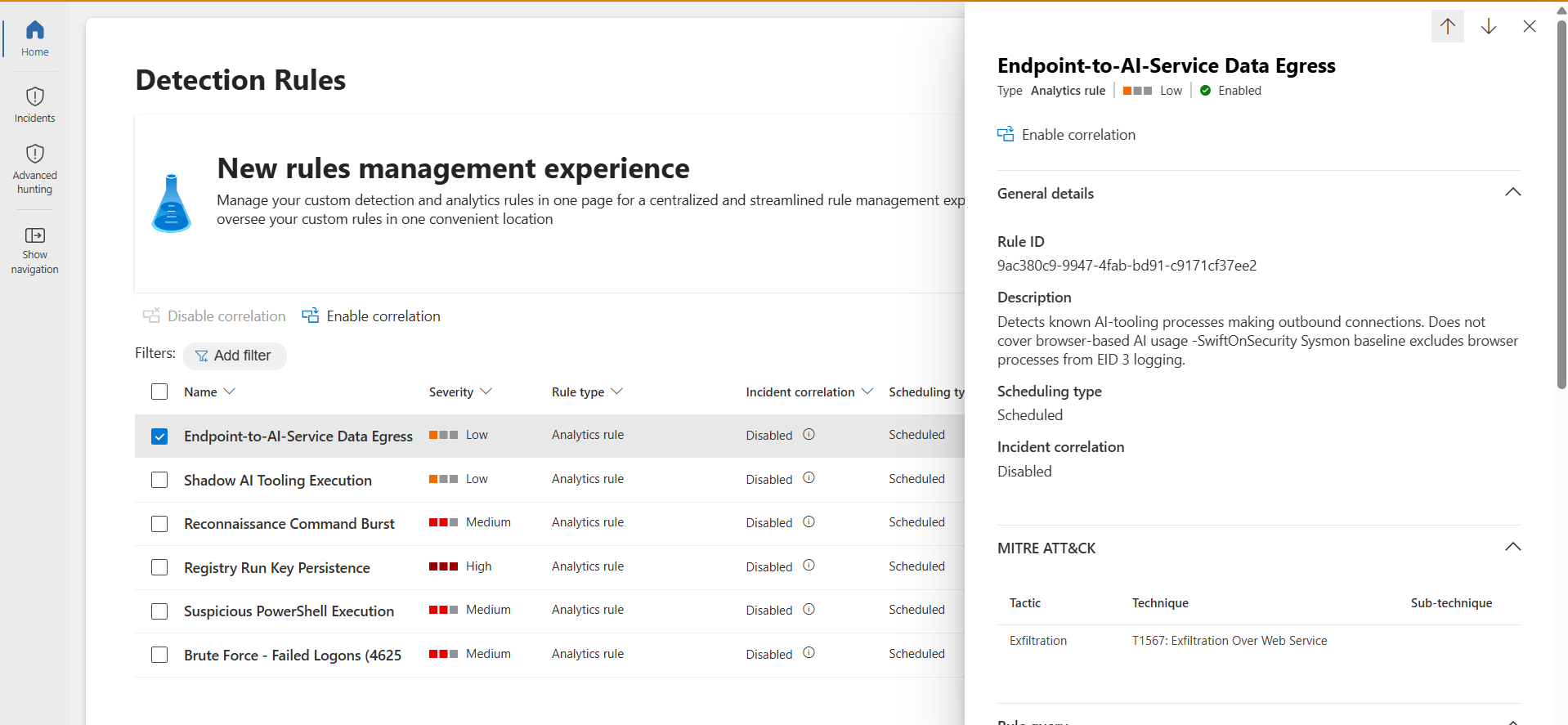
The browser-exclusion limitation is written directly into the rule description in Sentinel. No incident screenshot for this one by design — the writeup documents a telemetry-scope finding and rule configuration, not an incident walkthrough.

Endpoint-to-AI-Service Data Egress rule configuration including the documented browser-exclusion limitation
Rule configuration with the browser-exclusion limitation documented in the description
08
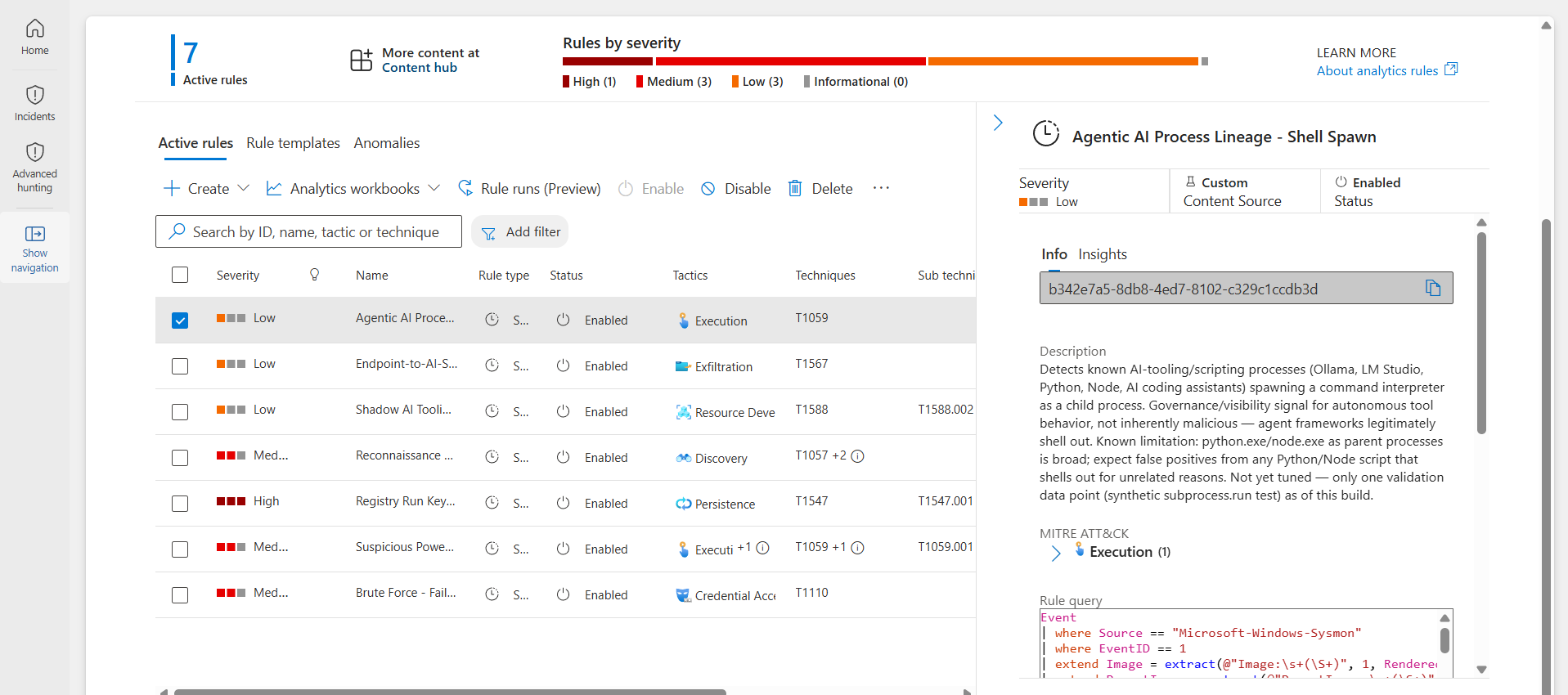
Agentic AI Process Lineage: Shell Spawn
T1059 · ExecutionSysmon EID 1, parent-child lineage
True-positive validated · not stress-tested

The threat

AI agent frameworks that autonomously execute commands by spawning a shell as a child process — LangChain-style agents, AI coding assistants, local LLM tools. Not inherently malicious — this is how agentic tools legitimately operate — but a meaningfully different risk profile from a human typing commands.

The detection

Event
| where Source == "Microsoft-Windows-Sysmon"
| where EventID == 1
| extend Image = extract(@"Image:\s+(\S+)", 1, RenderedDescription)
| extend ParentImage = extract(@"ParentImage:\s+(\S+)", 1, RenderedDescription)
| extend ProcessName = tolower(tostring(split(Image, "\\")[-1]))
| extend ParentProcessName = tolower(tostring(split(ParentImage, "\\")[-1]))
| where ParentProcessName has_any (
    "ollama.exe", "llamafile.exe", "lmstudio.exe",
    "claude.exe", "chatgpt.exe", "cursor.exe", "aider.exe",
    "python.exe", "node.exe"
  )
| where ProcessName has_any ("cmd.exe","powershell.exe","pwsh.exe","wscript.exe","cscript.exe","bash.exe")
| project TimeGenerated, Computer, ParentImage, Image

Known false-positive risk

python.exe and node.exe as parent processes is broad — almost any script that legitimately shells out for build tools, package managers, or CI would trigger this. Only one validation data point exists (a synthetic test), so this hasn't been exercised against real-world usage patterns yet. Stated as an open tuning item, not pretended away.

Validation

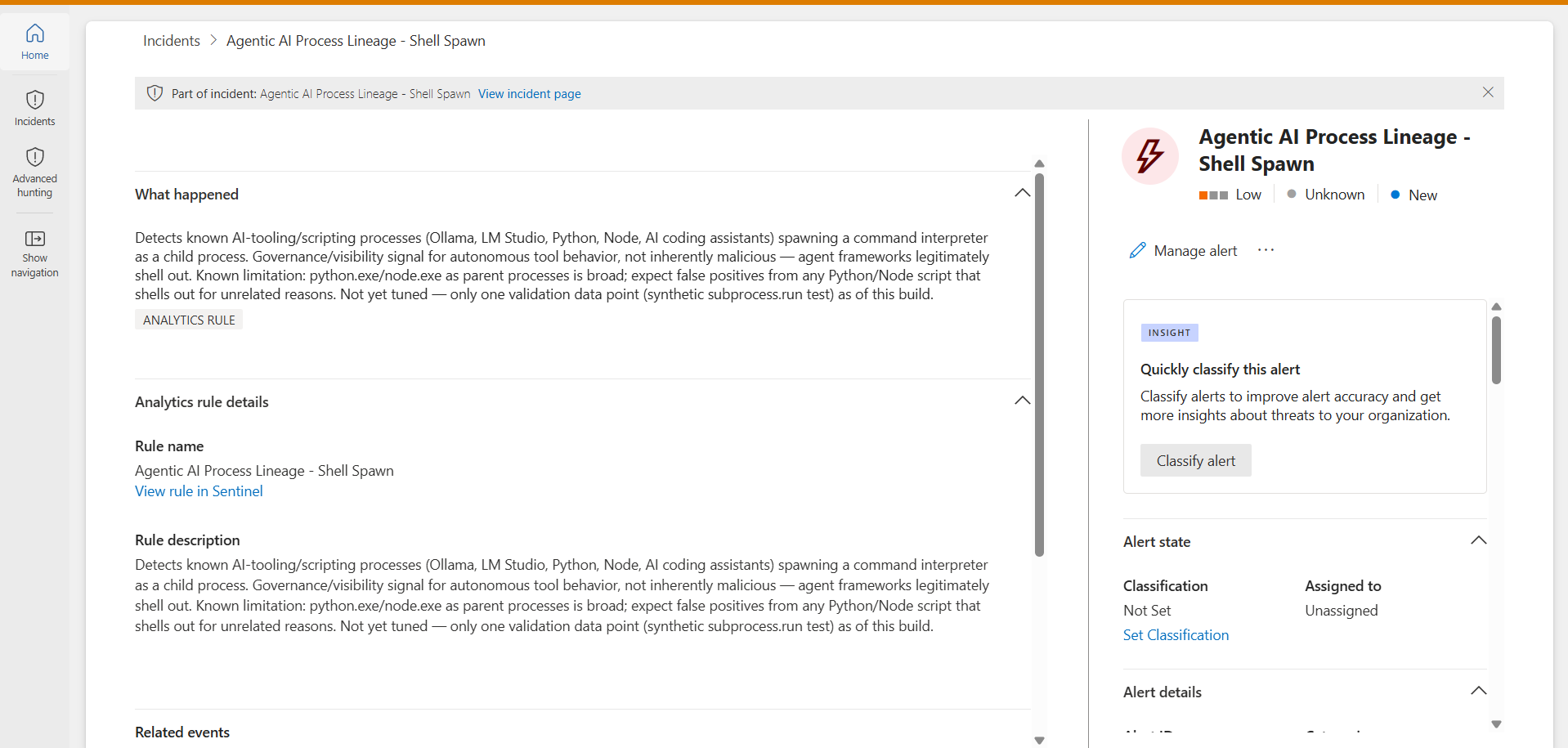
True positive: a 2-line Python script calling subprocess.run("cmd.exe /c echo agentic_test", shell=True) created a real python.exe → cmd.exe event, caught on the first attempt.

Agentic AI Process Lineage rule configured, including the documented false-positive-risk caveat
Rule config with FP-risk caveat in the description
Incident confirming the python.exe to cmd.exe spawn was caught
python.exe → cmd.exe spawn caught
Incident Response

A full IR playbook, not just a detection.

Detection 5 is paired with a complete incident response runbook — triage steps, containment sequencing, eradication, post-incident hunting query, and an escalation model framed around a solo-analyst / small-team reality rather than a hypothetical large SOC.

Triage (first 10 minutes)Assess source plausibility, pull 7-day sign-in history, confirm what was actually registered before deciding benign vs. suspicious.
ContainmentRevoke sessions first (kills active access), then remove the rogue MFA method, then force a password reset — sequencing matters.
Eradication & recoveryCheck inbox-forwarding rules and newly consented OAuth apps — common follow-on persistence after token theft.
Post-incidentTune the trusted-IP list, hunt the same pattern across other users with a provided KQL query, consider Conditional Access hardening.

Read the full playbook on GitHub →

Supporting Work

Beyond the Sentinel lab.

ElderSafe Connect — IAM for aged care

View on GitHub →
Team capstone · ICT30017, Swinburne University · my contribution: RBAC / access control

A Flask-based identity and access management system for an aged-care setting, where the access model has to map cleanly onto real care roles: administrators, nurses, carers, and residents. The platform layers TOTP-based MFA, JWT session management, bcrypt password hashing with Have I Been Pwned breach-checking, and a honeypot subsystem that emails admins on intrusion attempts.

My piece was the role-based access control layer. Rather than a flat role check, access is granted per staff-to-resident assignment with explicit read vs. write levels — a nurse can write care plans only for residents they're assigned to, a carer gets read-only on theirs, an admin sees everyone, and a resident sees a limited view of their own vitals. The access checks are enforced server-side against the assignment table on every request, so the permission boundary doesn't depend on the UI hiding things it shouldn't.

FlaskRBACJWTTOTP MFASupabase

Active Directory Lab

Self-built lab · Windows Server

A multi-site Active Directory environment built to practice the structural side of identity administration: promoted a second domain controller, stood up a Paris AD site on its own subnet, transferred the RID operations master (FSMO) role, and built a delegated-permissions OU structure — a Paris Admins security group with password-reset rights scoped only to the Paris OU, plus a contractor account with a hard expiry date. The point was least-privilege delegation done properly: giving a group exactly the rights it needs over exactly the objects it should touch, and nothing wider.

Active DirectoryGroup PolicyFSMO rolesDelegation
Writeups

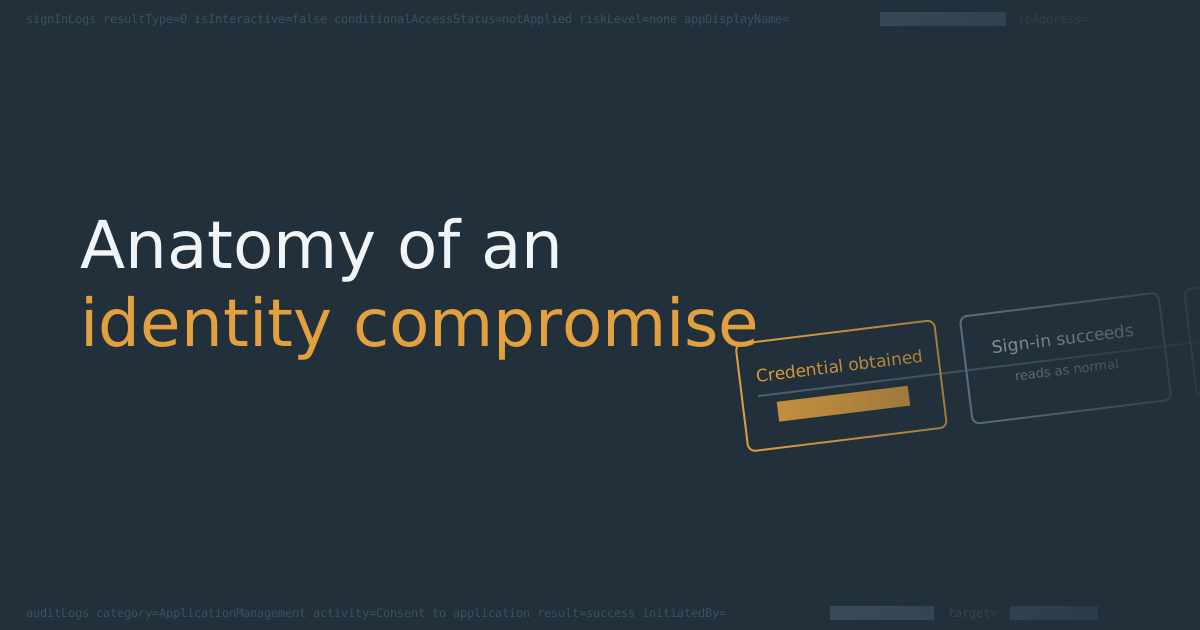
Anatomy of an identity compromise

A login-only intrusion, step by step, and where the detection actually lives

Cover: Anatomy of an identity compromise — a login-only intrusion, step by step

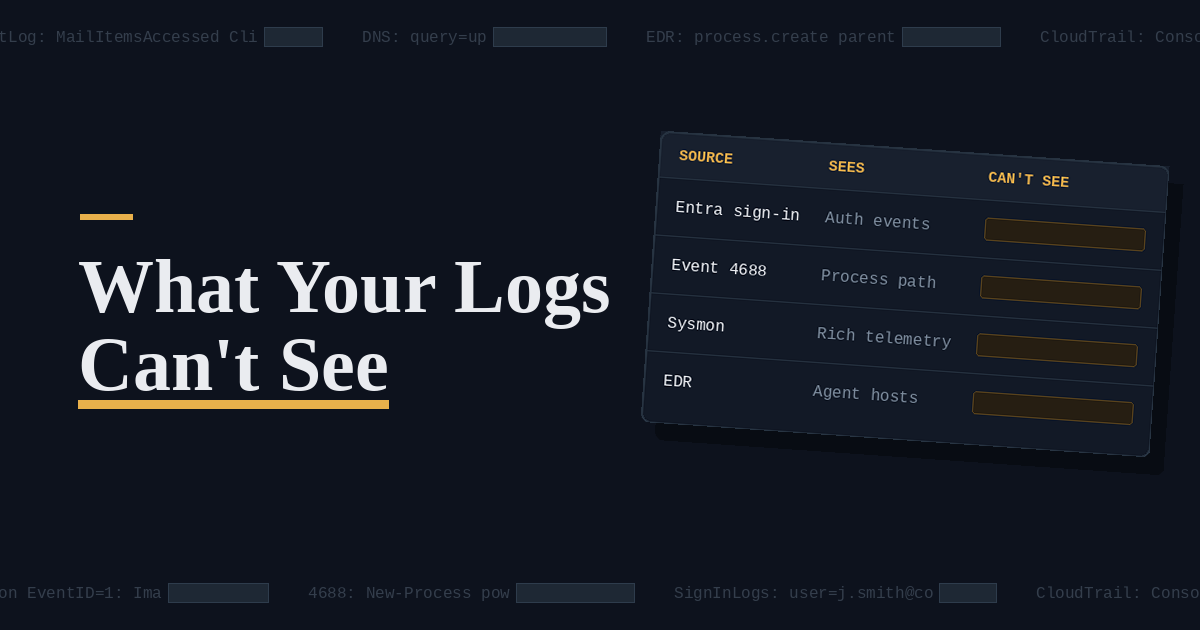
What your logs can't see

Nine common sources and the gaps they carry by design

Cover: What your logs can't see — a table of log sources against what each one cannot see

FortiBleed had around twenty people. JadePuffer had an agent. The way in was identical.

A coverage audit of my own Sentinel detections

Cover: FortiBleed and JadePuffer — the way in was identical

Humans Aren't the Weakest Link in Incident Response

The line that excuses broken process — and what it costs dwell time

Cover: Humans aren't the weakest link — a chain with the human link intact

More technical writing at kajalbuilds.hashnode.dev

Contact

Get in touch